
How to Size a Cloud Server for SaaS: CPU, RAM, NVMe, Backups
To size a cloud server for a SaaS app, do not start from the number of users. Start from memory per process, then CPU per container, then disk for data, WAL and backups, and confirm every guess with a load test. This guide does that for one real example: a Node.js API and worker, PostgreSQL, Redis and nginx in Docker Compose, tested on one machine. The profiles below are starting hypotheses; plain starting ranges are in the sizing guide.
The example stack
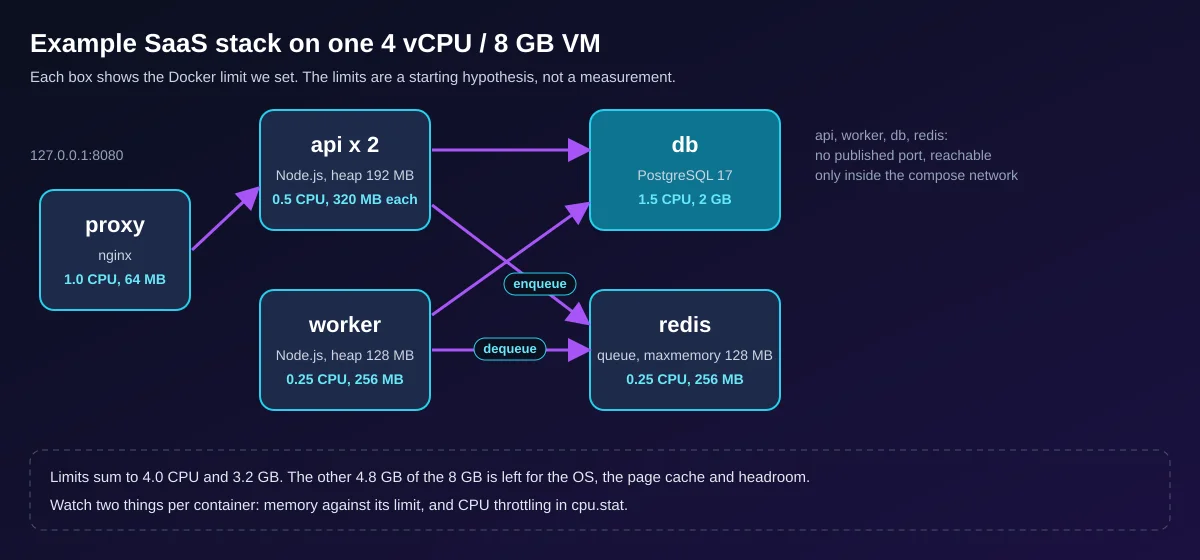
The example is a task-tracking API: an nginx proxy, two Node.js API replicas, a worker that drains a Redis queue, PostgreSQL 17 and Redis 7. Only the proxy publishes a port, on loopback. Secrets live in an uncommitted .env file, every service has a healthcheck and a resource limit, and logs rotate. Monitoring here is docker stats, cgroup counters and pg_stat_statements. For the Node.js side alone see Cloud Server for Node.js. The full files are at the end.
Why users do not map to vCPU
- Concurrency, not headcount - requests in flight = arrival rate x time per request (Little's law). 1000 users who click once a minute are about 17 requests a second; one script polling every second is the same load as 60 of them.
- SQL cost and runtime shape - in our run the report query averaged 1.07 ms in
pg_stat_statementsand the list query 0.07 ms, about 15 times apart. One Node.js process uses about one core, so API vCPU is the number of processes, not users. - Sockets, jobs and peaks - an open WebSocket holds memory for its whole life, a background job competes with requests for the same cores, and you size for the busiest hour, not the average.
Three starting profiles
Hypotheses, not measurements. Prices are monthly figures for Prague, recomputed from the rate card on 2026-10-14.
| Profile | Starting spec | Monthly price, basis |
|---|---|---|
| Dev / staging | 2 vCPU, 4 GB RAM, 40 GB NVMe (Small) | EUR 15.00, 1 backup |
| Small production | 4 vCPU, 8 GB RAM, 80 GB NVMe (Medium), the example as published | EUR 18.43, 1 backup |
| Growing SaaS, one server | 8 vCPU, 16 GB RAM, 160 GB NVMe (Large) | EUR 36.88, 1 backup |
| Growing SaaS, split | Medium app server plus a database server of 4 vCPU, 16 GB RAM, 160 GB NVMe | EUR 18.43 (1 backup) + EUR 39.05 (3 backups) = EUR 57.48 |
The memory, disk and backup arithmetic
The limits below are what the compose file sets; the last column is the resident memory docker stats showed during our load steps, across all runs.
| Container | Limit | Setting | Seen under load |
|---|---|---|---|
| proxy | 64 MB | nginx, one worker | 3-18 MB |
| api (x2) | 320 MB each | --max-old-space-size=192, pool of 10 |
21-34 MB each |
| worker | 256 MB | heap 128 MB, pool of 3 | 19-34 MB |
| db | 2 GB | shared_buffers 512 MB, work_mem 8 MB |
207-252 MB |
| redis | 256 MB | maxmemory 128 MB, no eviction |
4-7 MB |
The limits sum to 3.2 GB, so 4.8 GB of the 8 GB VM stays for the OS and the page cache. Three rules produce the numbers. First, shared_buffers starts at 25% of the memory of a dedicated database server (PostgreSQL docs, checked 2026-10-14): 25% of the 2 GB container is 512 MB. Second, work_mem is per sort or hash operation, not per connection, so the total can be many times the setting: 23 application connections at 8 MB with two such operations each is a worst case of 368 MB. Third, pools times processes (2 x 10 + 3 = 23) must stay under max_connections (50).
Disk and backups. After about 1.04 million rows the database was 146 MB but the data directory 457 MB, 288 MB of it pg_wal: WAL follows max_wal_size (a soft limit), not data size, so budget it and keep more than 20% of the disk free. On this tiny dataset pg_dump -Fc took 0.59 s (7 MB) and the restore 1.78 s; your restore time is your downtime, so measure it. Every DCXV Cloud price includes one weekly disk backup: a safety copy, not room for your files.
Find the bottleneck with k6
Fix the pass condition first (here p95 under 300 ms and under 1% failed requests), use an open model (constant-arrival-rate, see the k6 docs), raise the rate in steps and watch these signals together.
| Signal | Command | Bad sign |
|---|---|---|
| p95, errors, dropped iterations | k6 summary | p95 over target, the server cannot keep the arrival rate |
| CPU throttling | grep nr_throttled /sys/fs/cgroup/cpu.stat in the container |
grows during the step (kernel docs) |
| CPU steal | vmstat 5 column st |
above 0 on a VM: the host is contended |
| Memory pressure | docker stats, vmstat columns si so |
near the limit, or swapping |
Measured on a 12-core arm64 Linux machine with 14.4 GB RAM, Docker 29.7.2, k6 2.3.0, PostgreSQL 17.11, Node.js 22.23.3, nginx 1.27.5, Redis 7.4.11, on 2026-10-14, one 40 s run per step unless two values are shown. Not DCXV Cloud. k6 shared the CPUs with the stack, which was also swapping, so latencies are pessimistic: for a real test run k6 on a second machine. "Dropped" counts arrivals k6 skipped because all 500 virtual users were busy.
| nginx config | Offered req/s | Achieved req/s | p95 | Failed | Dropped |
|---|---|---|---|---|---|
| A, proxy 0.25 CPU | 1000 | 610 | 2.11 s | 0.03% | 15,595 |
| A, proxy 1.0 CPU | 1000 | 994 and 997 | 150 ms and 51.5 ms | 0% | 207 and 121 |
| A, proxy 1.0 CPU | 2000 | 941 | 1.77 s | 6.56% | 42,356 |
| B, keepalive | 1000 | 999 and 1000 | 2.66 ms and 2.42 ms | 0% | 36 and 0 |
| B, keepalive | 5000 | 4995 | 1.48 ms | 0% | 206 |
| B, keepalive | 8000 | 7918 | 23.1 ms | 0.02% | 2532 |
The lesson is the method, not the throughput. Config A used proxy_pass with a variable and no upstream block, so nginx opened a new TCP connection per request. The proxy hit its CPU limit first (cpu.stat: 1512 of 2787 periods throttled at 0.25 CPU, still a cap near 940 req/s at 1.0 CPU) while the database used well under half of its limit. Config B, an upstream with keepalive 32, kept the proxy near a third of one CPU at 8000 req/s. The next limits then showed up in the same counters: the database throttled in 301 of 2790 periods, and the 0.25 CPU worker throttled almost every period and left 46,982 jobs in the queue (LLEN jobs). A 146 MB dataset fits in memory, so none of this touched the disk. A fio check on a scratch file (fio --name=w --filename=fio.tmp --size=256M --rw=write --bs=8k --fdatasync=1 --ioengine=sync --runtime=15 --time_based) measured 700 synchronous writes per second at about 1.4 ms; a random-read run (fio --name=r --filename=fio.tmp --size=256M --rw=randread --bs=4k --iodepth=32 --ioengine=libaio --direct=1 --runtime=15 --time_based) reported 399,000 IOPS, which is the page cache, not the disk.
Price the result on the configurator
- Open the cloud server page. It does not read numbers from this article, so set them yourself: pick the plan row closest to your profile (Small, Medium or Large), then adjust the CPU (1-96), RAM (1-256 GB) and disk (20-960 GB) sliders to your worksheet values.
- Add backup copies, extra IPv4 addresses and administration hours, then read the full monthly price, not the "from" price. Managed administration starts at EUR 30 for two hours.
Checked against the rate card on 2026-10-14: Medium with 3 backups is EUR 21.47, and the same CPU with 16 GB RAM is EUR 29.95. RAM moves the price most.
Configure a Cloud Server for Your App
When to split the database or go dedicated
- Split the DB when it needs more than about half of the VM memory, when API and DB throttle each other for CPU, or when you want a separate restore cadence. See the PostgreSQL guide.
- Go dedicated when one workload keeps more than 70% of all vCPU busy at peak, needs more than the 96 vCPU or 256 GB RAM of a cloud server, or needs predictable disk latency. See dedicated servers.
Migration and rollback template
Rehearse it on the new server first.
| Step | Action | Rollback |
|---|---|---|
| 1 | Restore a recent dump on the new server, run the app, load-test it | delete the new server |
| 2 | Freeze writes, take the final dump, restore, compare row counts | reopen writes on the old server |
| 3 | Switch DNS (TTL lowered to 300 s a full old TTL earlier), smoke-test login, order, job and mail | point DNS back |
| 4 | Keep the old server read-only for at least a week | replay new writes on the old side |
Sizing worksheet
Print it and fill the right column from your own measurements.
| Item | How to get it | Your value |
|---|---|---|
| Peak requests per second | analytics or a load test | |
| Target p95 and failed rate | your SLO, for example 300 ms and 1% | |
| API processes | one per vCPU | |
| Container memory limit | peak RSS under load plus margin | |
| DB connections | pools x processes, under max_connections |
|
| Free memory kept | 20-25% of the VM | |
| Disk | data and growth + WAL + logs + images + scratch dump, then 20% free | |
| Backups | copies kept, restore time you measured | |
| Monthly price | configurator total with backups, IPv4, admin, date |
Reproduce it
You need Docker with Compose, curl, openssl and vmstat; the k6 image is pulled on first run. The files are the ones we ran, with these versions. The postgres:17-alpine, redis:7-alpine and node:22-alpine tags float and npm install has no lockfile, so pin the tags and versions if you need the same result.
compose.yaml
# "Small production" starting hypothesis for a 4 vCPU / 8 GB VM: limits sum to 4.0 CPU and 3.2 GB
name: saas-sizing

x-logging: &logging
  driver: json-file
  options: { max-size: 10m, max-file: "3" }   # logs cannot fill the disk

services:
  proxy:
    build: { context: ., dockerfile: Dockerfile.proxy }
    ports: ["127.0.0.1:8080:80"]        # the only published port, loopback only
    depends_on:
      api: { condition: service_healthy }
    healthcheck:
      test: ["CMD", "wget", "-qO-", "http://127.0.0.1/healthz"]
      interval: 10s
      timeout: 3s
      retries: 3
    deploy: { resources: { limits: { cpus: "1.0", memory: 64M } } }
    logging: *logging
    restart: unless-stopped

  api:
    build: .
    command: ["node", "--max-old-space-size=192", "src/api.js"]
    env_file: [.env]
    environment:
      PG_POOL: "10"
    expose: ["3000"]
    depends_on:
      db: { condition: service_healthy }
      redis: { condition: service_healthy }
    healthcheck:
      test: ["CMD", "wget", "-qO-", "http://127.0.0.1:3000/readyz"]
      interval: 10s
      timeout: 3s
      retries: 3
    deploy:
      replicas: 2
      resources: { limits: { cpus: "0.5", memory: 320M } }
    logging: *logging
    restart: unless-stopped

  worker:
    build: .
    command: ["node", "--max-old-space-size=128", "src/worker.js"]
    env_file: [.env]
    environment:
      PG_POOL: "3"
    depends_on:
      db: { condition: service_healthy }
      redis: { condition: service_healthy }
    healthcheck:
      test: ["CMD-SHELL", "pgrep -f src/worker.js >/dev/null"]
      interval: 15s
      timeout: 3s
      retries: 3
    deploy: { resources: { limits: { cpus: "0.25", memory: 256M } } }
    logging: *logging
    restart: unless-stopped

  db:
    image: postgres:17-alpine
    env_file: [.env]
    command: [postgres,
      -c, shared_buffers=512MB, -c, effective_cache_size=1536MB,
      -c, work_mem=8MB, -c, maintenance_work_mem=128MB,
      -c, max_connections=50, -c, max_wal_size=1GB,
      -c, shared_preload_libraries=pg_stat_statements,
      -c, log_min_duration_statement=250, -c, track_io_timing=on]
    volumes: ["pgdata:/var/lib/postgresql/data"]
    # no "ports": reachable only from the compose network
    shm_size: 256m
    healthcheck:
      test: ["CMD-SHELL", "pg_isready -U $$POSTGRES_USER -d $$POSTGRES_DB"]
      interval: 10s
      timeout: 3s
      retries: 5
    deploy: { resources: { limits: { cpus: "1.5", memory: 2G } } }
    logging: *logging
    restart: unless-stopped

  redis:
    image: redis:7-alpine
    env_file: [.env]
    command: ["sh", "-c", "exec redis-server --requirepass \"$$REDIS_PASSWORD\" --maxmemory 128mb --maxmemory-policy noeviction --appendonly yes"]
    volumes: ["redisdata:/data"]
    healthcheck:
      test: ["CMD-SHELL", "REDISCLI_AUTH=\"$$REDIS_PASSWORD\" redis-cli ping | grep -q PONG"]
      interval: 10s
      timeout: 3s
      retries: 5
    deploy: { resources: { limits: { cpus: "0.25", memory: 256M } } }
    logging: *logging
    restart: unless-stopped

volumes:
  pgdata:
  redisdata:
Dockerfile
FROM node:22-alpine
WORKDIR /app
COPY package.json ./
RUN npm install --omit=dev --no-audit --no-fund
COPY src ./src
USER node
Dockerfile.proxy
FROM nginx:1.27-alpine
COPY nginx.conf /etc/nginx/nginx.conf
nginx.conf
worker_processes 1;
events { worker_connections 1024; }
http {
  access_log off;
  # resolved once at start: restart the proxy if the api containers get new addresses
  upstream api {
    server api:3000;
    keepalive 32;   # reuse upstream connections instead of one TCP connect per request
  }
  server {
    listen 80;
    location = /healthz { return 200 "ok\n"; }
    location / {
      proxy_pass http://api;
      proxy_http_version 1.1;
      proxy_set_header Connection "";
      proxy_set_header Host $host;
      proxy_read_timeout 10s;
    }
  }
}
package.json
{
  "name": "saas-sizing-example",
  "private": true,
  "type": "module",
  "dependencies": {
    "ioredis": "5.4.1",
    "pg": "8.13.1"
  }
}
src/db.js
import pg from 'pg'
import Redis from 'ioredis'

// pool size x processes must stay under Postgres max_connections (see the budget table)
export const pool = new pg.Pool({
  connectionString: process.env.DATABASE_URL,
  max: Number(process.env.PG_POOL || 10),
  statement_timeout: 5000,
})
export const redis = new Redis(process.env.REDIS_URL, { maxRetriesPerRequest: 2 })
src/api.js
import http from 'node:http'
import { pool, redis } from './db.js'

const json = (res, code, body) => {
  res.writeHead(code, { 'content-type': 'application/json' })
  res.end(JSON.stringify(body))
}
const readBody = req => new Promise((ok, fail) => {
  let s = ''
  req.on('data', c => { s += c; if (s.length > 4096) req.destroy() })
  req.on('end', () => ok(s))
  req.on('error', fail)
})

const routes = {
  'GET /healthz': (req, res) => json(res, 200, { ok: true }),
  // readiness touches both stores; the container healthcheck uses it
  'GET /readyz': async (req, res) => {
    await pool.query('select 1')
    await redis.ping()
    json(res, 200, { ok: true })
  },
  'GET /api/tasks': async (req, res, url) => {
    const account = Number(url.searchParams.get('account'))
    if (!Number.isInteger(account) || account < 1) return json(res, 400, { error: 'account' })
    const { rows } = await pool.query(
      'select id, title, status from tasks where account_id = $1 order by id desc limit 20', [account])
    json(res, 200, rows)
  },
  'GET /api/report': async (req, res, url) => {
    const account = Number(url.searchParams.get('account'))
    if (!Number.isInteger(account) || account < 1) return json(res, 400, { error: 'account' })
    const { rows } = await pool.query(
      'select status, count(*)::int as n from tasks where account_id = $1 group by status', [account])
    json(res, 200, rows)
  },
  'POST /api/tasks': async (req, res) => {
    let b
    try { b = JSON.parse(await readBody(req)) } catch { return json(res, 400, { error: 'json' }) }
    const account = Number(b.account)
    if (!Number.isInteger(account) || account < 1 || typeof b.title !== 'string' || b.title.length > 200) {
      return json(res, 400, { error: 'input' })
    }
    const { rows } = await pool.query(
      "insert into tasks (account_id, title) values ($1, $2) returning id", [account, b.title])
    await redis.lpush('jobs', String(rows[0].id))
    json(res, 201, { id: rows[0].id })
  },
}

const server = http.createServer(async (req, res) => {
  const url = new URL(req.url, 'http://x')
  const h = routes[`${req.method} ${url.pathname}`]
  if (!h) return json(res, 404, { error: 'not found' })
  try { await h(req, res, url) } catch (e) {
    console.error(e.message)
    json(res, 503, { error: 'unavailable' })
  }
})
server.listen(3000, () => console.log('api up'))

// compose sends SIGTERM on stop: finish in-flight requests, then close the stores
process.on('SIGTERM', () => server.close(async () => { await pool.end(); redis.disconnect(); process.exit(0) }))
src/worker.js
import { createHash } from 'node:crypto'
import { pool, redis } from './db.js'

let stop = false
process.on('SIGTERM', () => { stop = true })

// stands in for real background work (mail, PDF, webhook): a little CPU, then one UPDATE
const work = title => {
  let h = title
  for (let i = 0; i < 2000; i++) h = createHash('sha256').update(h).digest('hex')
  return h.slice(0, 16)
}

console.log('worker up')
while (!stop) {
  const r = await redis.brpop('jobs', 2)
  if (!r) continue
  const id = Number(r[1])
  const { rows } = await pool.query('select title from tasks where id = $1', [id])
  if (!rows.length) continue
  await pool.query("update tasks set status = 'done', result = $2 where id = $1", [id, work(rows[0].title)])
}
await pool.end()
redis.disconnect()
init.sql
create extension if not exists pg_stat_statements;
create table tasks (
  id bigserial primary key,
  account_id int not null,
  title text not null,
  status text not null default 'open',
  result text,
  created_at timestamptz not null default now()
);
create index tasks_account_id_idx on tasks (account_id, id desc);
seed.sql
-- 1,000,000 tasks for 2,000 accounts (about 500 each), 70% done
insert into tasks (account_id, title, status)
select 1 + (g % 2000), 'task ' || g, case when g % 10 < 7 then 'done' else 'open' end
from generate_series(1, 1000000) g;
analyze tasks;
make-env.sh
#!/bin/sh
# writes .env with random secrets; never commit it, and never reuse these values elsewhere
set -eu
[ -e .env ] && { echo ".env exists, not overwriting"; exit 1; }
PG=$(openssl rand -hex 24)
RD=$(openssl rand -hex 24)
umask 077
cat > .env <<EOF
POSTGRES_USER=app
POSTGRES_PASSWORD=$PG
POSTGRES_DB=app
REDIS_PASSWORD=$RD
DATABASE_URL=postgres://app:$PG@db:5432/app
REDIS_URL=redis://:$RD@redis:6379
EOF
k6.js
import http from 'k6/http'
import { check } from 'k6'

const BASE = __ENV.BASE || 'http://proxy'
const RATE = Number(__ENV.RATE || 100)

// open model: requests arrive at RATE per second whether or not the server keeps up,
// which is how real users behave (closed-loop VUs hide overload)
export const options = {
  scenarios: {
    mixed: {
      executor: 'constant-arrival-rate',
      rate: RATE,
      timeUnit: '1s',
      duration: __ENV.DURATION || '30s',
      preAllocatedVUs: 50,
      maxVUs: 500,
    },
  },
  thresholds: {
    http_req_failed: ['rate<0.01'],
    http_req_duration: ['p(95)<300'],
  },
  summaryTrendStats: ['avg', 'med', 'p(90)', 'p(95)', 'p(99)', 'max'],
}

export default function () {
  const account = 1 + Math.floor(Math.random() * 2000)
  const r = Math.random()
  let res
  if (r < 0.80) res = http.get(`${BASE}/api/tasks?account=${account}`)
  else if (r < 0.90) res = http.get(`${BASE}/api/report?account=${account}`)
  else res = http.post(`${BASE}/api/tasks`, JSON.stringify({ account, title: 'k6 task' }),
    { headers: { 'content-type': 'application/json' } })
  check(res, { 'status 200/201': x => x.status === 200 || x.status === 201 })
}
bench.sh
#!/bin/sh
# usage: ./bench.sh 200 500 1000   (requests per second, one 40 s step each)
set -eu
NET=$(docker compose ps -q proxy | xargs docker inspect --format '{{range $k, $v := .NetworkSettings.Networks}}{{$k}}{{end}}')
for RATE in "$@"; do
  echo "=== ${RATE} req/s"
  # mid-run snapshot of container CPU / memory and host CPU steal ("st") and swap ("si so")
  ( sleep 20; docker stats --no-stream --format '{{.Name}} cpu={{.CPUPerc}} mem={{.MemUsage}}' $(docker compose ps -q); vmstat 5 2 | tail -1 ) &
  docker run --rm -i --network "$NET" -e RATE="$RATE" -e DURATION=40s \
    grafana/k6 run --quiet - < k6.js 2>&1 | grep -E 'http_req_duration\.|http_req_failed\.|http_reqs|dropped_iterations|vus_max'
  wait
done
sh make-env.sh
docker compose up -d --build
docker compose exec -T db sh -c 'psql -v ON_ERROR_STOP=1 -q -U $POSTGRES_USER -d $POSTGRES_DB' < init.sql
docker compose exec -T db sh -c 'psql -v ON_ERROR_STOP=1 -q -U $POSTGRES_USER -d $POSTGRES_DB' < seed.sql
curl -s http://127.0.0.1:8080/readyz
./bench.sh 500 1000
docker compose down -v
Your numbers will differ. When they do, trust them over ours, then configure a cloud server for your app or write to sales@dcxv.com.