Jenkins hosting, controller and agents apart
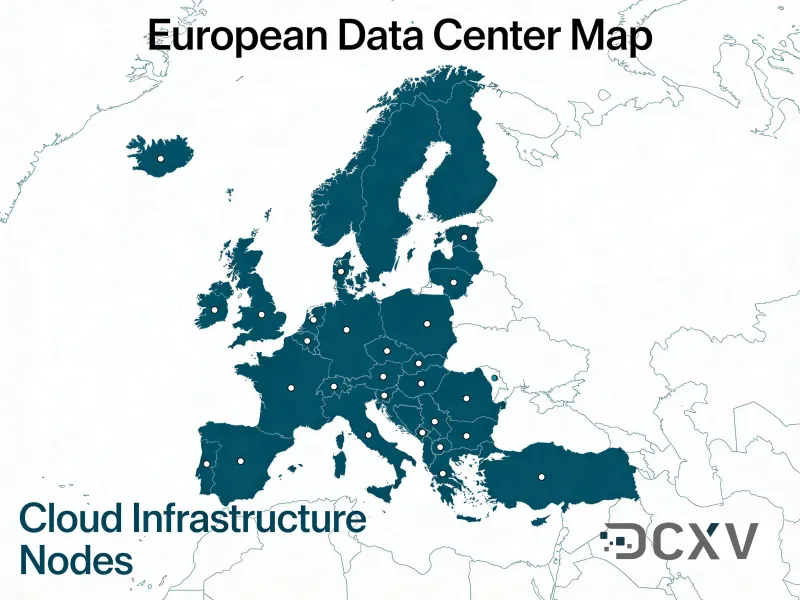
A Jenkins controller on its own machine in Prague or Covilha, with the builds pushed out to agents where they belong - which is the one piece of sizing advice the Jenkins project gives and the one most installations ignore.
Who it is for
A Jenkins that lives under someone desk
It has been building since 2019, nobody remembers which plugins matter, and the whole release process depends on a tower with one disk and no backup.
A controller running its own builds
Executors were allocated on the controller because it was easier, and now a heavy job takes the web interface down with it - which the Jenkins documentation calls out as bad practice in exactly those terms.
A team that cannot move to hosted CI
Twelve years of pipelines, a plugin nobody has replaced, and a job that talks to hardware. Jenkins is not the problem; the machine under it is.
What a machine of its own buys you
- A controller that stays responsive, because the builds run on agents rather than on the thing serving the web interface.
- JENKINS_HOME on NVMe with a snapshot before every plugin upgrade, so the rollback is two clicks rather than an evening.
- Agents added as separate hosts and connected over SSH or the inbound protocol, sized differently from the controller.
- A static IPv4 from AS204057, so an internal registry, an artifact store or a deploy target can allowlist the controller by address.
- Any agent you need alongside it - Linux for the builds, Windows Server with a licence from us when a job needs it.
- Tier III facilities, a backup included, and a machine that does not depend on the office air conditioning.
Sized by what the pipeline actually does
The Jenkins project deliberately refuses to publish a single hardware number, calling sizing an inexact science, and puts controller memory anywhere from 200 MB for a small install to 70 GB and beyond for a large one. What it does say plainly is where the work goes: do not allocate executors on the controller, because a build can overload it and take it down. So size the controller for the interface, the plugins and the job history, and add agents for the builds. One caveat on the billing shape: a flat monthly host costs the same on a quiet week, where hosted CI minutes cost nothing - Jenkins is usually running most days, which is exactly when this wins.
How to install Jenkins on Debian or Ubuntu
The stable LTS line, from the Jenkins project own repository, in the order they document it. Java 21 or later is a requirement, not a suggestion.
-
Install Java
sudo apt update
sudo apt install fontconfig openjdk-21-jre
java -version
Jenkins requires Java 21 or later. fontconfig comes with it in the documented command because plugins that render images fail confusingly without it.
-
Add the Jenkins LTS repository
sudo wget -O /etc/apt/keyrings/jenkins-keyring.asc \
  https://pkg.jenkins.io/debian-stable/jenkins.io-2026.key
echo "deb [signed-by=/etc/apt/keyrings/jenkins-keyring.asc]" \
  https://pkg.jenkins.io/debian-stable binary/ | sudo tee \
  /etc/apt/sources.list.d/jenkins.list > /dev/null
debian-stable is the LTS line; the plain debian path is the weekly one. The signing key is rotated, so take the current filename from the Jenkins page rather than from an older guide.
-
Install and start it
sudo apt update
sudo apt install jenkins
sudo systemctl enable jenkins
sudo systemctl start jenkins
Jenkins listens on port 8080 and runs as its own jenkins user, with everything that matters under /var/lib/jenkins. That directory is what you snapshot and what you back up.
-
Unlock the first login
sudo cat /var/lib/jenkins/secrets/initialAdminPasswordOpen the server on port 8080 and paste that value. Do not leave it reachable from the whole internet while you set it up - bind it behind our VPN gateway, or restrict port 8080 to your office address first.
-
Take the builds off the controller
# Manage Jenkins -> Nodes -> Built-In Node -> set executors to 0
# then Manage Jenkins -> Nodes -> New Node for each agent host
This is the one piece of sizing advice the Jenkins documentation states outright: allocating executors on the controller lets a build overload it and crash it. Set the built-in node to zero executors and add agent hosts, which it recommends keeping generic and interchangeable rather than tailored per job.
-
Connect an agent over SSH
sudo -u jenkins ssh-keygen -t ed25519 -f /var/lib/jenkins/.ssh/agent
sudo -u jenkins ssh-copy-id -i /var/lib/jenkins/.ssh/agent.pub jenkins@AGENT-HOST
Add the private key as an SSH Username with private key credential, then create the node with the SSH launch method. Each agent connection costs the controller a couple of threads and a little over 2 MB, so a handful of agents is not what sizes the controller - the plugins and the job history are.
Checked against the official documentation on 2026-08-15 - read the source
What we are not
- We are not the Jenkins project. Jenkins is a trademark of the Linux Foundation and the software is theirs; nothing here is endorsed by them. We sell the machine it runs on.
- We do not maintain your plugins. Plugin upgrades are where Jenkins installations break, and the person who knows which of your 60 plugins matter is on your side of this - though a snapshot before each upgrade is on ours.
- We do not migrate your jobs for you as part of the price. We will help with the window and the copy of JENKINS_HOME, and quote the rest if you want it done rather than helped with.
- There is no managed Jenkins control plane here. If you want somebody else to own the upgrades entirely, a hosted CI product is the honest answer and this is not it.
- Windows agents need Windows Server licences, which we can supply on the server, but any tool licence the build needs stays yours.
The parts teams discover late
- JENKINS_HOME is the whole installation - configuration, job history, credentials, plugins. Back that up and a controller is rebuildable in an hour; skip it and it is not rebuildable at all.
- Snapshot before every plugin upgrade. It is the single change most likely to take a working Jenkins down, and a snapshot turns that into a two-click rollback.
- Zero executors on the controller is the documented recommendation, not a preference. A build that overloads the controller takes the web interface with it.
- Agents should be interchangeable. The documentation argues for generic, fungible agents rather than one specially configured host per job, because the specially configured one is always the one that is down.
- Port 8080 is not a place to leave an unlocked Jenkins. Put it behind a VPN gateway or an address allowlist before the first login, not after.
- Controller memory scales with plugins, job count and build history, not with how hard the builds are - that load belongs to the agents.
Hosted CI minutes versus a runner of your own
| Provider-hosted CI minutes | A runner on DCXV | |
|---|---|---|
| What you pay for | Every minute every job runs, for as long as the project exists | A flat monthly host, whatever the pipeline does that month |
| A build that gets slower | Costs more every month it stays slow | Costs nothing more - the machine is already paid for |
| Docker layer cache | Cold on each job unless you upload and download it yourself | Warm on local NVMe, between jobs and between days |
| Concurrency | A plan tier you upgrade | A number you set in your own configuration file |
| Where the checkout lands | A shared fleet, often in a region you cannot pin | One machine in Prague or Covilha, under a Cyprus contract |
| Outbound address | A large shared range that nothing can allowlist | One static IPv4 from AS204057, yours to allowlist |
| What the machine can hold | Whatever the runner image happens to ship with | Any toolchain, licence or fixture set you install once |
How this gets going on your host
Say what the pipeline does
The heaviest job you run today, how many you want running at once, and whether it builds container images. That is enough to size a host without guessing.
We hand over the machine
Prague or Covilha, root access and a static IPv4, in under ten minutes. Bring your own image if the runner is already baked into one.
Follow the walkthrough on this page
It is the vendor sequence, taken from their current documentation rather than from a blog post, and it takes a few minutes on a clean host.
Snapshot it, then add the second one
Take a snapshot once the first pipeline is green, so the next machine is a restore instead of a rebuild. A pool grows by adding hosts, not by making one enormous.
Why choose us
- Tier III certified facilities, 99.982% facility SLA
- Own network, AS204057, IPv4 and IPv6 dual-stack
- 24/7/365 support with ~10 minute average response
- Cyprus company, EU jurisdiction, GDPR-native since 2007
FAQ
Frequently asked questions
What do I need to install Jenkins on Ubuntu or Debian?
Java 21 or later, then the Jenkins project apt repository. Install fontconfig and openjdk-21-jre, add the debian-stable keyring and sources line from pkg.jenkins.io, apt install jenkins, enable and start the service, then unlock it with the value in /var/lib/jenkins/secrets/initialAdminPassword. Jenkins listens on port 8080. The full sequence is on this page
How much RAM does a Jenkins controller need?
The Jenkins project deliberately refuses to give one number, calling sizing an inexact science and putting controller memory anywhere between 200 MB for a small installation and 70 GB or more for a very large one. What scales it is plugins, job count and build history rather than how hard the builds are - because the builds should not be running on the controller. 8 GB is a comfortable start for a small team
Should builds run on the Jenkins controller?
No, and the documentation says so directly: allocating executors on a controller is bad practice because a build can overload its CPU or memory and crash it. Set the built-in node to zero executors and add agents. The project also recommends keeping agents generic and interchangeable rather than tailoring one host per job
How do I back up Jenkins?
JENKINS_HOME, which is /var/lib/jenkins on a package install, is the entire installation: configuration, job definitions, build history, credentials and plugins. Back that up and a controller is rebuildable in an hour. Every plan here includes a backup, and a snapshot before each plugin upgrade turns the change most likely to break Jenkins into a two-click rollback
How do I connect a build agent?
The usual route is SSH: generate a key as the jenkins user, put the public half on the agent host, add the private half as an SSH credential and create the node with the SSH launch method. Each agent connection costs the controller a couple of threads and a little over 2 MB, so agents are not what sizes a controller
Is it safe to leave Jenkins on port 8080?
Not on the open internet. Put it behind our VPN gateway or restrict the port to your own addresses before the first login, not after - the initial admin password sits in a file on a server that is, until you do, answering the whole world. A static IPv4 from AS204057 makes the allowlist on the other side straightforward too
If you require assistance or have additional questions, please contact the managers or write to the support team at support@dcxv.com
Ready to get started?
- Monthly billing
- No setup fee
- No lock-in