Microsoft Code Red After a 24-Hour Outage: What to Change
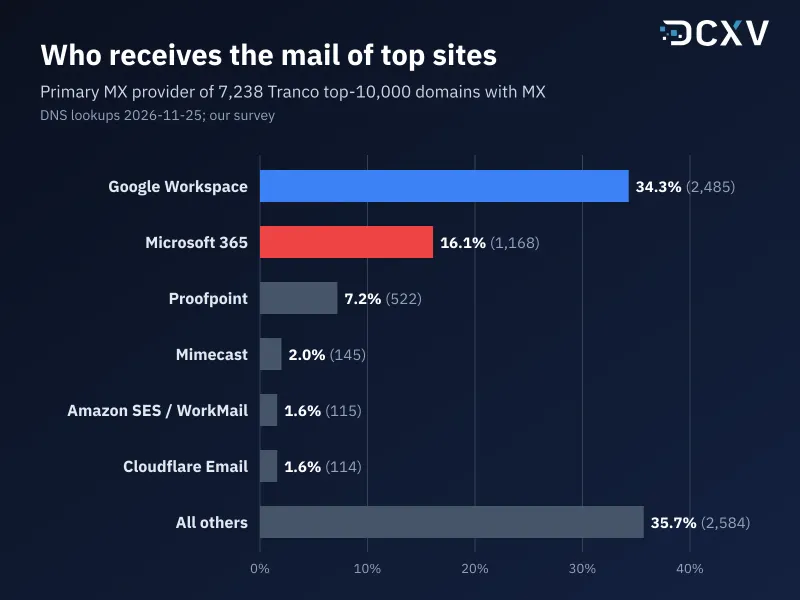
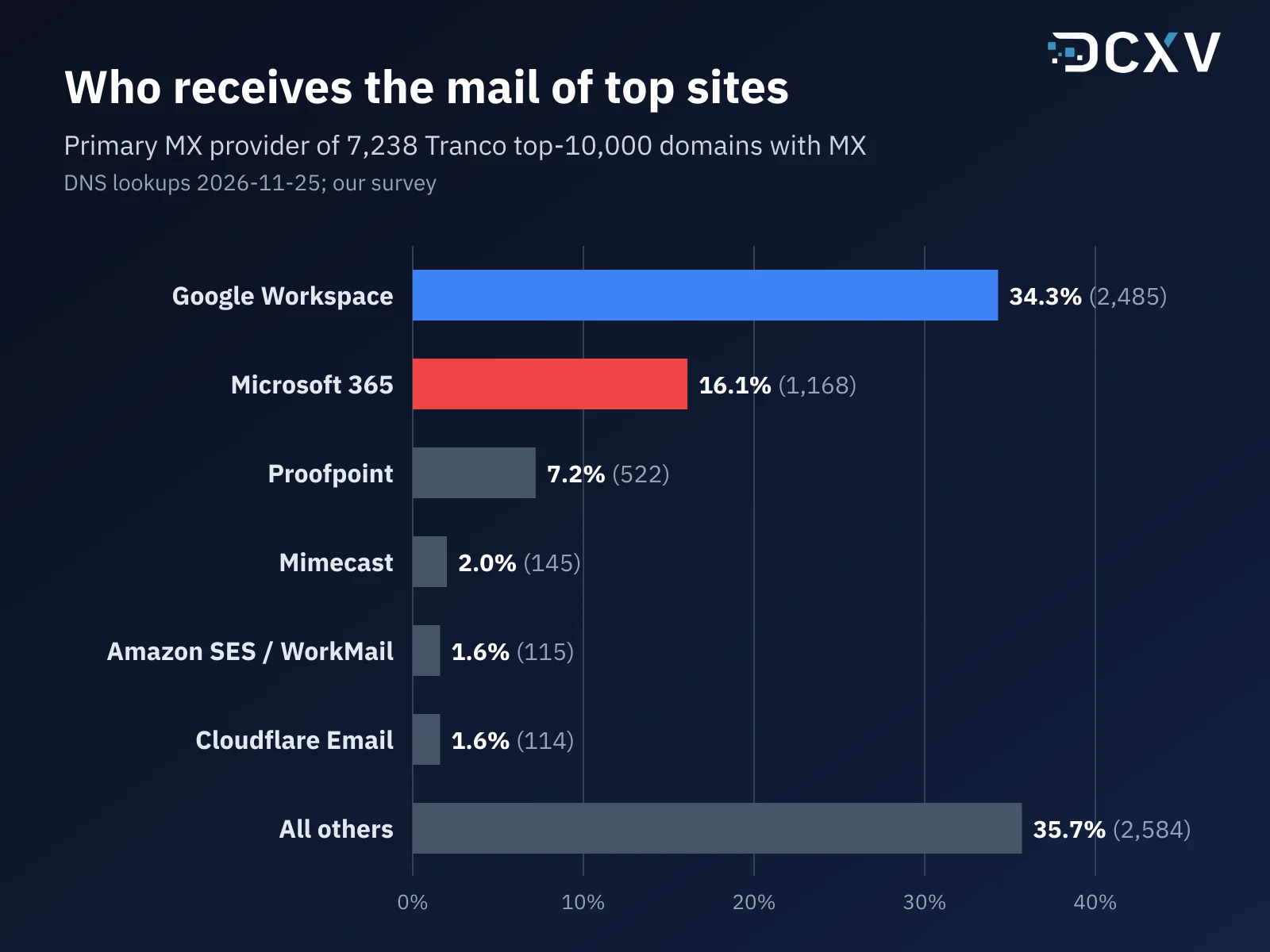
Short answer (checked 2026-11-25): on 12-13 November 2026, Exchange Online, Outlook, Teams and Copilot failed worldwide for about 24 hours. Microsoft's own staff memo calls it "the most customer-impacting incident in the history of Exchange Online", and the company has now declared an internal "Code Red". The trigger was not exotic: a defect shipped in July sat dormant until a traffic shift landed on a gateway fleet already running with less capacity. What it means for you is practical. The SLA credit is capped at a share of one month's fee and must be claimed by 31 December 2026. In our own DNS survey, 16.1% of the top domains that receive mail route it to Microsoft first, and 96.2% of those have no backup MX outside Microsoft. Keep the tools you need during an outage off the provider that is down.
Source. Reuters exclusive "Microsoft declares 'Code Red' after historic outage, internal memos show", 2026-11-24 (read via the BNN Bloomberg and Korea Times reprints; Hacker News thread the same day). The technical cause comes from Charles Lamanna's root-cause summary on X, as reported by SlashGear on 2026-11-18 and the Wikipedia article (read 2026-11-25). SLA terms: Microsoft's Online Services SLA, version of 2026-11-17.
What broke
- Scope. Exchange Online mailboxes, Outlook on every client, Teams calendars and Copilot's access to mail, worldwide. Microsoft 365 incident ID MO1550821. Other products (Teams chat, OneDrive, SharePoint) were hit less because they could move to a secondary gateway group; Exchange Online could not.
- Cause, per Lamanna. A "latent defect" in a networking gateway server fix made servers unresponsive under certain load. Maintenance had cut the gateway fleet's capacity by 14%, a routine switch of Teams traffic then added load, and at the peak more than 80% of the gateway servers stopped answering.
- Why it spread. The capacity units meant to contain a failure did not isolate this one, so it crossed regions. Automated rollback could not help, because the faulty change had gone out in July.
- Why recovery was slow. Servers had to be taken out in batches, patched and restarted, and returning servers were flooded by clients retrying at once: a cascading failure in Lamanna's words.
- Not an attack. Microsoft said the incident was not related to cyber activity or AI agents.
Public sources disagree on the exact start and end times (Wikipedia puts the first acknowledgement at 17:54 UTC on 12 November; a timeline compiled from the incident record starts hours earlier). We use Reuters' "about 24 hours".
What "Code Red" means inside Microsoft
According to the memos Reuters reviewed, Jason Henderson, president of M365 Core, told staff that "Code Red means that this is the highest priority work for our team", with daily meetings with the Substrate leadership team and weekly reviews. Amanda Silver, corporate vice president for M365 Core, set out five workstreams around load shedding, geographic partitioning of traffic and faster recovery, with a target of resolving a worldwide incident within one hour. Microsoft also plans AI agents that help engineers read system health data faster. Two details matter more than the slogan: in a separate recent incident, an urgent production fix "took five to six days to reach worldwide saturation", and Lamanna said the affected component had seen "roughly ten years' worth of acceptable failures". CEO Satya Nadella apologised publicly.
For a customer, the lesson is that a defect, a capacity cut for maintenance and a routine traffic change are each ordinary. At hyperscale they can line up, and when they do, a single shared component takes down every tenant at once.
Our own data: who receives the mail of top sites
We ran our own script over the Tranco top 10,000 domains (list JZW4Y) and looked up each domain's MX records through 1.1.1.1 and 8.8.8.8. A domain counts for the provider of its lowest-preference MX host. Output, run on a DCXV Cloud server with Bun 1.4.4 on 2026-11-25:
Tranco list JZW4Y top 10000, bun 1.4.4, 2026-11-25T07:04:11.302Z, 14 s
no MX 2733, lookup errors 29, with MX 7238
primary (lowest preference) MX provider:
  other                       2584  35.7%
  Google Workspace            2485  34.3%
  Microsoft 365 / Outlook     1168  16.1%
  Proofpoint                   522  7.2%
  Mimecast                     145  2.0%
  Amazon (SES / WorkMail)      115  1.6%
  Cloudflare Email Routing     114  1.6%
  Yandex                        72  1.0%
  Barracuda                     23  0.3%
  Apple                         10  0.1%
Microsoft anywhere in MX set 1180; Microsoft is the only MX provider 1135 (96.2% of those)
single MX host 2801 (38.7%)
rank 1-100: with MX 66, Microsoft 18.2%, Google 27.3%
rank 101-1000: with MX 625, Microsoft 14.2%, Google 34.1%
rank 1001-5000: with MX 2799, Microsoft 15.1%, Google 34.5%
rank 5001-10000: with MX 3748, Microsoft 17.2%, Google 34.4%
How to read it:
- One in six top domains with mail points it straight at Microsoft, at every rank band from the top 100 down. Google is about twice as common, so a similar Google fault would reach more domains.
- It is a floor, not a ceiling. Proofpoint and Mimecast are filtering gateways; many of their 667 domains deliver to Microsoft 365 mailboxes behind them, which DNS cannot show.
- Almost nobody keeps a second path. Of the 1,180 domains with Microsoft in their MX set, 1,135 list no other provider. A backup MX would not have helped users read mail, but it would have kept inbound mail in a queue you control.
What the SLA pays for 24 hours down
Microsoft measures Exchange Online downtime in user-minutes: the minutes users could not send or receive mail with Outlook on the web, over a calendar month. Credits are 25% of the month's fee below 99.9%, 50% below 99% and 100% below 95%. Our arithmetic for November (30 days, 43,200 minutes):
| Scenario in November | Downtime share | Uptime | Credit |
|---|---|---|---|
| 24 h, all users | 3.33% | 96.67% | 50% |
| 24 h, half the users | 1.67% | 98.33% | 50% |
| 24 h, a quarter of users | 0.83% | 99.17% | 25% |
| 24 h, 3% of users | 0.10% | 99.90% | none |
| 43 min, all users | 0.10% | 99.90% | none |
Three things follow from the document itself. Credits are "your sole and exclusive remedy". For Microsoft 365 the claim must arrive by the end of the month after the incident, so 31 December 2026 for this one (Azure claims: 60 days). And the claim must include the time and duration, affected resources and the number and locations of affected users: collect that evidence now, while logs still exist. A 99.9% month allows about 43 minutes of full outage; this one lasted roughly 33 times that.
What to change before the next one
- File the claim if your tenant was hit, with your own timeline from monitoring and help-desk tickets, not only Microsoft's incident ID.
- Keep incident tools off the provider that fails. Status page, on-call alerts, a chat channel, runbooks and the password vault should not need Microsoft 365 or Entra sign-in to work. A small cloud server at another provider is enough for these.
- Lower the MX TTL in advance so a switch to a fallback route takes minutes, not a day; our DNS propagation guide shows what TTLs really do.
- Know what senders do. RFC 5321 (4.5.4.1) says mail servers should keep retrying for at least 4-5 days, so inbound mail to a dead MX is mostly delayed, not lost. Sending, reading and calendars are what stop.
- Keep a copy you can open. Export or sync critical mailboxes and documents to storage you control, and test a restore as in our backup and restore guide.
- Treat vendor support as part of the risk. Our AWS support and billing guide shows the same pattern from the AWS side: response times depend on the plan you pay for.
Our own SLA is 99.9% network uptime, and a day with more than four hours of downtime is refunded as a day, up to half a month. No credit, ours included, pays for a day of lost business: the design does.
Infrastructure that is not shared with everyone else
Our Tier III data centres in Prague and Covilha run cloud servers and dedicated servers at a fixed monthly price, a sound home for the status page, monitoring, mail relay and backups you need when a big platform is down. Tell us what must keep running at sales@dcxv.com and we will suggest a setup.