AWS Emulator for Terraform Tests: What 46,037 Checks Show
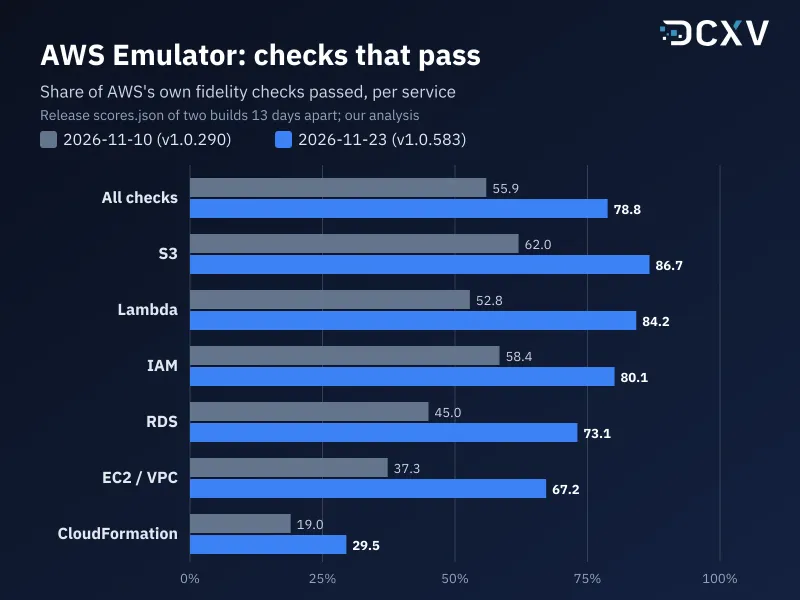
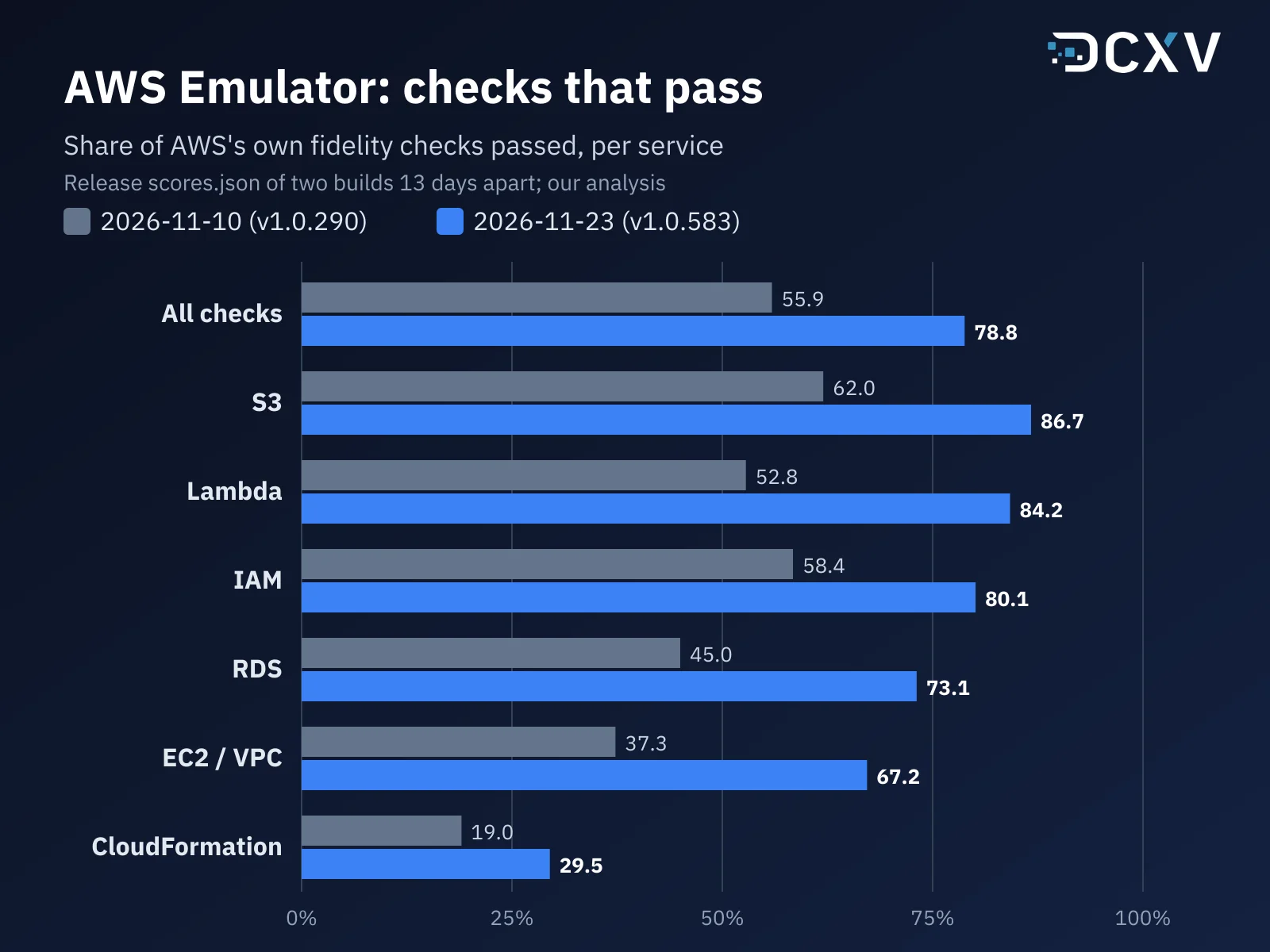
Short answer (checked 2026-11-23): AWS Emulator, released by AWS on 2026-11-11, answers AWS API calls on your own machine, so terraform plan and apply can run in CI without an AWS account or a bill. It is useful and it is improving fast: in AWS's own published fidelity scores, the share of checks that pass rose from 55.9% to 78.8% in 13 days. A green run still proves less than it looks. IAM policies are not enforced the way AWS enforces them, checks that go through CloudFormation pass only 29.5% of the time, and the 12 OpenTofu checks in the suite were skipped in both releases we read, so no published score yet tells you how Terraform fares. Use the emulator as a fast first gate, keep a short real-AWS stage for what it cannot prove, and run both on a CI runner you control.
Source. "Testing Terraform with AWS Emulator", a blog post of 2026-11-12, reached Hacker News and Lobsters on 2026-11-22. The Register covered the launch on 2026-11-12. Product facts below come from the AWS Emulator User Guide and the GitHub repository, read 2026-11-23.
What AWS released
- A local program that serves an AWS API endpoint over HTTPS on
127.0.0.1:9297with a self-signed certificate. Each start writes fresh credentials, a config file and a CA certificate to~/.aws/emulator/9297/; the account ID is000000000000. - Written in Rust, source under CC0 1.0 (the
vendor/code under Apache 2.0). Linux .deb and .rpm packages, Docker on macOS and Windows, or an embedded mode for Rust tests. No service fee and no AWS account needed. - One account and one Region per emulator, all state in memory: stop it and every resource is gone.
- Telemetry is on by default;
--telemetry offorEMULATOR_TELEMETRY=offturns it off. - Maintained by AI agents with releases many times a day; AWS does not accept pull requests. The version moved from 1.0.290 to 1.0.583 between the two score files we read.
- The security page says not to use it to test security: some services evaluate IAM policies, but not the way AWS does, "the emulator never denies a request signed with its own key", and KMS key policies and S3 bucket policies are not checked.
We downloaded the current Debian package (1.0.583-1): 215 MB to fetch, 1.2 GB unpacked. The guide puts idle memory at about 160 MiB, growing with the resources your tests create, and shows a 2 GB cap as an example.
What the blog post tested
The author pointed the Terraform AWS provider at the emulator (custom endpoints for EC2, Lambda, IAM, STS, CloudWatch, Logs, EventBridge and SNS, credential and account-ID checks skipped, path-style S3) and ran init, validate, plan and apply in GitHub Actions. A 15-resource stack (VPC, subnet, security group, Lambda, EventBridge rule, SNS topic, CloudWatch alarm) applied, and the pipeline took 1 min 25 s. A deliberately bad DynamoDB table name passed plan and failed apply with a ValidationException: exactly the class of bug a plan alone misses. The limits he hit: no IAM permission checks, some operations answered 501 NotImplemented, and the logs do not show which API calls arrived. On Hacker News, commenters added that globally unique names such as S3 buckets cannot be checked locally and that AWS sometimes tightens validation without notice.
Our own data: AWS's fidelity scores, two releases apart
Every release ships a scores.json.gz with the result of each fidelity check run against the emulator. We ran our own script over the files of release v1.0.290 (scored 2026-11-10, the oldest with scores) and v1.0.583 (scored 2026-11-23). A check counts for a service when the service is among those it calls; pass rates leave skipped checks out; CFN means checks that also go through CloudFormation.
Output, run on a DCXV Cloud server with Python 3.14.4 on 2026-11-23:
scored         2026-11-10                     2026-11-23
commit         97e8711774                     616e510b6c
checks         42,634                         46,037
passed         23,774 (55.9%)                 36,210 (78.8%)
failed         18,788                         9,740
skipped        72                             87
wire pass      36.0%                          59.6%
scenario pass  62.4%                          85.1%
wire 501       1,219                          714
CloudFormation 19.0% of 4,142                 29.5% of 4,525
OpenTofu       12 skipped/runner-tool-missing 12 skipped/runner-tool-missing
s3             62.0% of 2,748, CFN 60.5%      86.7% of 2,971, CFN 71.3%
iam            58.4% of 1,178, CFN 29.2%      80.1% of 1,374, CFN 42.9%
lambda         52.8% of 2,918, CFN 44.7%      84.2% of 3,085, CFN 75.6%
ec2            37.3% of 2,467, CFN 15.4%      67.2% of 2,635, CFN 46.5%
rds            45.0% of 755, CFN 5.3%         73.1% of 813, CFN 42.9%
dynamodb       66.4% of 1,683, CFN 50.0%      88.6% of 2,770, CFN 80.7%
sqs            70.2% of 1,486, CFN 58.0%      86.4% of 1,594, CFN 68.8%
events         71.6% of 961, CFN 10.0%        90.7% of 1,004, CFN 52.0%
The services a typical Terraform web stack touches, from the same output:
| Service | Pass 2026-11-10 | Pass 2026-11-23 | Checks 2026-11-23 | Via CloudFormation |
|---|---|---|---|---|
| S3 | 62.0% | 86.7% | 2,971 | 71.3% |
| Lambda | 52.8% | 84.2% | 3,085 | 75.6% |
| IAM | 58.4% | 80.1% | 1,374 | 42.9% |
| RDS | 45.0% | 73.1% | 813 | 42.9% |
| EC2 / VPC | 37.3% | 67.2% | 2,635 | 46.5% |
How to read it:
- Fast progress, uneven coverage. 23 points in 13 days overall. Wire checks (one call's answer compared with AWS's) rose from 36.0% to 59.6%, multi-step scenario checks from 62.4% to 85.1%, and failures answered with
501 NotImplementedfell from 1,219 to 714. - EC2 and RDS are the weak spots of a usual web stack: one EC2 check in three still fails. Networking modules (VPCs, routes, security groups) are where an emulator pass means least.
- Infrastructure as code is the weakest layer. Checks through CloudFormation pass 29.5%, and all 1,869
TypeNotFoundExceptionfailures in the newer file are CloudFormation resource types the emulator does not know yet. Terraform does not use CloudFormation, but the 12 OpenTofu checks were skipped in both releases (runner-tool-missing): there is no published Terraform score at all. - A score is a snapshot. These are two of many daily builds. Pin the version in CI and re-read its score file when you upgrade.
A test setup that holds up
The AWS SDKs and CLI find a running emulator through these variables from the AWS guide (documented form; we did not run the emulator or Terraform for this post):
export AWS_ENDPOINT_URL=https://127.0.0.1:9297
export AWS_SHARED_CREDENTIALS_FILE=~/.aws/emulator/9297/emulator_credentials
export AWS_CONFIG_FILE=~/.aws/emulator/9297/config
export AWS_CA_BUNDLE=~/.aws/emulator/9297/ca.pem
export AWS_EC2_METADATA_DISABLED=true
export AWS_REGION=us-east-1
export EMULATOR_TELEMETRY=off
For the Terraform AWS provider, the explicit form from the blog post is the safe one: an endpoints {} block that names every service your code uses, plus skip_credentials_validation, skip_requesting_account_id, skip_metadata_api_check and s3_use_path_style = true. A service you forget to list goes to real AWS. Then build the pipeline in four steps:
fmt,validateandplanon every push. No cloud at all.applyanddestroyagainst the emulator on every push. This catches API validation errors such as the DynamoDB name, broken references and missing dependencies. Pin the emulator version and cap its memory.- A short real-AWS stage in a sandbox account before merging, for IAM policies, quotas, globally unique names and everything the scores mark weak (EC2 networking, RDS) or the emulator answers with 501. Destroy at the end: even a test stack pays $0.005 an hour per public IPv4 (see our AWS support and billing guide).
- Keep the state backend out of the emulator. Its memory is wiped on every restart.
Where to run it
The emulator binds to 127.0.0.1 by default; keep it there, and never start it with -a off on a shared host, because that serves every unsigned request. Give each CI job its own emulator (-p 0 picks a free port). A self-hosted runner fits well: our CI runner package is 4 vCPU, 8 GB RAM and 120 GB NVMe for EUR 19.96 a month excl. VAT (cloud server plans, 2026-11-23), room for the 1.2 GB package and 2-3 parallel jobs each capped at 2 GB. The sizing method is in sizing a cloud server for Docker and Node.js; if coding agents drive the pipeline, isolate them as in hosting AI coding agents on an EU VPS.
A runner for your Terraform pipeline
Our Tier III data centres in Prague and Covilha run cloud servers that make steady self-hosted runners for infrastructure tests, at a fixed monthly price with no per-call billing. Send your job count and test duration to sales@dcxv.com and we will suggest a size.