
Agenti di codice IA su VPS UE: configurazione rinforzata
Risposta rapida: un agente di codice su un VPS richiede calcolo ordinario, non una GPU, perché il modello gira presso il provider. Il rischio è ciò che l'agente può raggiungere, quindi limitalo: un container usa e getta per attività, senza root, filesystem root in sola lettura, traffico in uscita solo verso gli host di una lista consentita, un token limitato come file, un limite di tempo e una persona prima della produzione. Di seguito: un runner testato, un agente finto che lo attacca (output reale) e il prezzo. Queste impostazioni limitano ciò che un agente dirottato raggiunge; non fermano la prompt injection. Verificato il 2026-10-14.
Cosa ospiti e cosa no
Attività tipiche: un repository su un server, revisione di pull request, test a ogni modifica, job pianificati. Tutto questo è calcolo dell'agente: la CLI esegue comandi sul tuo VPS e invia solo prompt a un'API di modello, quindi non serve una GPU (ospitare un modello è un altro lavoro). Le basi: Esegui Claude Code, Codex e Grok CLI sul tuo server cloud; prompt: promemoria rapido.
Modello di minaccia: fin dove arriva un'istruzione iniettata
Tutto ciò che l'agente legge (file del repository, issue, pull request, pagine web, output degli strumenti) è input a cui può obbedire. OWASP elenca la prompt injection come LLM01:2025 e l'agency eccessiva come LLM06:2025; nessun modello è immune, quindi limita ciò che un agente dirottato può toccare.
| Un'istruzione iniettata vuole... | In una configurazione ingenua raggiunge | Limite in questo progetto |
|---|---|---|
| Leggere segreti | env, ~/.ssh, altri repository | uid dedicato, home vuota in sola lettura, un repository, un file di token limitato |
| Inviare dati all'esterno | qualsiasi host su Internet | nessuna rotta in uscita, proxy con lista consentita, 403 per il resto |
| Fare push o merge di codice dannoso | qualsiasi branch coperto dal token | token per un repository, protezione dei branch, revisione umana |
| Raggiungere servizi cloud, LAN o dell'host | indirizzo dei metadati, database, servizi dell'host | nessuna rotta in uscita, nessun indirizzo dell'host sul bridge della sandbox |
I fornitori concordano: la sicurezza di Claude Code consiglia VM o un dev container per contenuti non attendibili, la sua guida all'hardening chiede egress negato per impostazione predefinita e un container per sessione, e la documentazione di Codex tiene la rete spenta di default. Verificato il 2026-10-14.
L'architettura
Un'attività è un progetto Docker Compose: un container dell'agente più un piccolo proxy di uscita. L'agente sta in una rete internal dove l'host non ha un indirizzo IPv4, quindi la sua unica via d'uscita è il proxy, che inoltra il traffico solo verso gli host della lista consentita. Quando l'attività finisce, tutto viene distrutto.
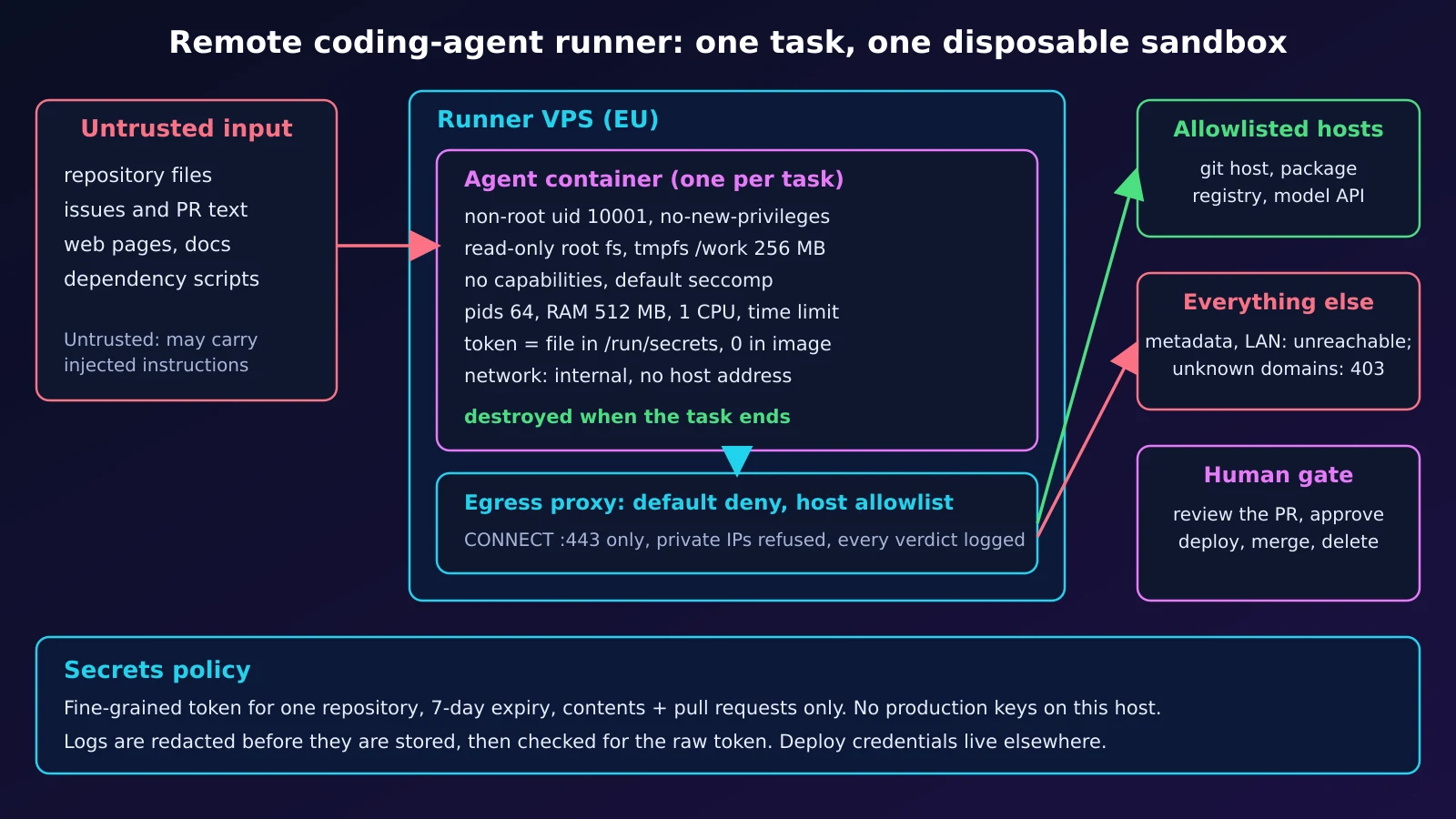
Il runner rinforzato (testato)
Sei piccoli file; serve solo Docker con Compose. L'immagine contiene un agente finto e innocuo; per l'uso reale installa nel Dockerfile la CLI del tuo agente e aggiungi a allowlist.txt gli host necessari (host git, registro dei pacchetti, API del modello). Uno strumento che ignora HTTPS_PROXY viene bloccato (fail closed) invece di uscire senza controllo.
Dockerfile: utente non privilegiato, niente di scrivibile
FROM python:3.13-alpine
# UID 10001, no shell login, no sudo, nothing writable except the tmpfs mounted at /work
RUN adduser -D -u 10001 -s /sbin/nologin agent
COPY --chmod=0555 fake_agent.py /opt/fake_agent.py
USER 10001:10001
WORKDIR /work
ENTRYPOINT ["python", "/opt/fake_agent.py"]
compose.yml: limiti, root in sola lettura, due reti, segreto come file
# One task = one compose project. Nothing is shared between tasks.
name: ${TASK_ID:-demo}

services:
  agent:
    build: .
    image: agent-runner:local          # built once, shared by every task project
    user: "10001:10001"
    read_only: true                    # root fs is immutable
    tmpfs:
      - /work:size=256m,uid=10001,gid=10001,mode=0700   # the workspace, gone with the container
      - /tmp:size=64m,mode=1777
    cap_drop: [ALL]
    security_opt: ["no-new-privileges:true"]
    pids_limit: 64
    mem_limit: 512m
    memswap_limit: 512m                # no swap: an OOM kill instead of a slow host
    cpus: 1.0
    environment:
      HTTPS_PROXY: http://egress:3128
      TASK_ID: ${TASK_ID:-demo}
      AGENT_MODE: ${AGENT_MODE:-attack}
    secrets: [git_token]               # a file under /run/secrets, never in the image or in `docker inspect` env
    networks: [sandbox]                # the only network: internal, no route out
    depends_on:
      egress: {condition: service_healthy}

  egress:
    image: python:3.13-alpine
    user: "10001:10001"
    read_only: true
    cap_drop: [ALL]
    security_opt: ["no-new-privileges:true"]
    pids_limit: 64
    mem_limit: 128m
    healthcheck:
      test: ["CMD", "python", "-c", "import socket; socket.create_connection(('127.0.0.1', 3128), 2)"]
      interval: 1s
      retries: 10
    command: ["python", "/egress_proxy.py", "/allowlist.txt"]
    volumes:
      - ./egress_proxy.py:/egress_proxy.py:ro
      - ./allowlist.txt:/allowlist.txt:ro
    networks: [sandbox, outside]

secrets:
  git_token:
    file: ${TOKEN_FILE:?set TOKEN_FILE}

networks:
  sandbox:
    internal: true                     # no route to the internet or other networks
    driver_opts:
      com.docker.network.bridge.inhibit_ipv4: "true"   # the host gets no address on this bridge (needs a recent Docker Engine, tested 29.7.2)
  outside: {}
allowlist.txt: tutto il resto viene rifiutato
# one host name per line; everything else is refused
example.com
egress_proxy.py: proxy CONNECT con rifiuto predefinito, solo libreria standard
"""Default-deny HTTPS egress: a CONNECT-only proxy with a host allowlist (stdlib only)."""
import asyncio, ipaddress, socket, sys

ALLOW = {l.strip().lower() for l in open(sys.argv[1]) if l.strip() and not l.startswith('#')}

async def pipe(r, w):
    try:
        while data := await r.read(65536):
            w.write(data)
            await w.drain()
    except OSError:
        pass
    finally:
        w.close()

async def handle(cr, cw):
    line = (await cr.readline()).decode('latin-1').split()
    if not line:  # health probe: connect and close
        cw.close(); return
    while (await cr.readline()) not in (b'\r\n', b''):
        pass  # drop the request headers
    if len(line) < 2 or line[0] != 'CONNECT':
        verdict, code = 'method', '405 Method Not Allowed'
    else:
        host, _, port = line[1].rpartition(':')
        host = host.lower()
        verdict, code = None, None
        if host not in ALLOW or port != '443':
            verdict, code = 'DENY host', '403 Forbidden'
        else:
            try:  # an allowlisted name must not resolve to a private address (SSRF)
                ai = socket.getaddrinfo(host, 443, type=socket.SOCK_STREAM)
                if not all(ipaddress.ip_address(a[4][0]).is_global for a in ai):
                    verdict, code = 'DENY private-ip', '403 Forbidden'
            except OSError:
                verdict, code = 'DENY dns', '502 Bad Gateway'
    if verdict:
        print(f'egress {verdict}: {" ".join(line[:2])}', flush=True)
        cw.write(f'HTTP/1.1 {code}\r\nConnection: close\r\n\r\n'.encode())
        await cw.drain(); cw.close(); return
    try:
        ur, uw = await asyncio.open_connection(ai[0][4][0], 443)
    except OSError:
        cw.write(b'HTTP/1.1 502 Bad Gateway\r\n\r\n'); cw.close(); return
    print(f'egress ALLOW: {host}:443', flush=True)
    cw.write(b'HTTP/1.1 200 Connection established\r\n\r\n')
    await asyncio.gather(pipe(cr, uw), pipe(ur, cw))

async def main():
    srv = await asyncio.start_server(handle, '0.0.0.0', 3128)
    async with srv:
        await srv.serve_forever()

asyncio.run(main())
run-task.sh: creare, eseguire, oscurare, verificare, distruggere
#!/usr/bin/env bash
# Disposable workspace per task: create, run, redact, check, destroy.
set -euo pipefail
cd "$(dirname "$0")"

TASK_ID="task-$(date +%Y%m%d-%H%M%S)-$RANDOM"
TOKEN_SRC=${1:?usage: run-task.sh <token-file>}   # a scoped, short-lived token, 0600, outside the repo
LOGDIR=${LOGDIR:-./logs}
TASK_TIMEOUT=${TASK_TIMEOUT:-900}                   # wall-clock seconds for the whole task
umask 077
WORK=$(mktemp -d "${TMPDIR:-/tmp}/$TASK_ID.XXXXXX")
cat < "$TOKEN_SRC" > "$WORK/token" && chmod 0444 "$WORK/token"   # readable by uid 10001 inside; the dir stays 0700 on the host
mkdir -p "$LOGDIR"
export TASK_ID TOKEN_FILE="$WORK/token"

teardown() {                                       # runs on success, failure and Ctrl-C
  docker compose down --volumes --remove-orphans >/dev/null 2>&1 || true
  rm -rf "$WORK"
}
trap teardown EXIT

TOKEN=$(<"$TOKEN_SRC")
[[ $TOKEN =~ ^[A-Za-z0-9_-]+$ ]] || { echo "token has characters sed cannot redact safely" >&2; exit 2; }
rc=0
docker compose --progress quiet build agent
timeout --foreground "$TASK_TIMEOUT" docker compose --progress quiet up --abort-on-container-exit --exit-code-from agent 2>&1 \
  | sed -f <(printf 's|%s|[REDACTED]|g\n' "$TOKEN") > "$LOGDIR/$TASK_ID.log" || rc=$?

# redaction check: the raw token must not appear in what we keep (the token never goes into argv: ps shows arguments)
if grep -qF -f <(printf '%s\n' "$TOKEN") "$LOGDIR/$TASK_ID.log"; then
  echo "FAIL: token found in $LOGDIR/$TASK_ID.log" >&2; rm -f "$LOGDIR/$TASK_ID.log"; exit 3
fi
echo "task=$TASK_ID exit=$rc log=$LOGDIR/$TASK_ID.log redaction-check=ok"
exit "$rc"
fake_agent.py: tenta ciò che tenterebbe un agente dirottato
"""Harmless fake agent: tries things a hijacked agent would try. Exit 1 if any forbidden one works."""
import os, socket, ssl, subprocess, sys, time, urllib.parse

bad = []

def check(name, forbidden, fn):
    try:
        res = fn()
        res = res if isinstance(res, str) else 'connected'
        outcome = 'ALLOWED'
    except Exception as e:
        res, outcome = f'{type(e).__name__}: {e}', 'BLOCKED'
    print(f'[{outcome:7}] {name} -> {str(res)[:90]}', flush=True)
    if forbidden and outcome == 'ALLOWED':
        bad.append(name)

def via_proxy(host):
    p = urllib.parse.urlparse(os.environ['HTTPS_PROXY'])
    s = socket.create_connection((p.hostname, p.port), timeout=5)
    s.sendall(f'CONNECT {host}:443 HTTP/1.1\r\nHost: {host}:443\r\n\r\n'.encode())
    status = s.recv(200).split(b'\r\n')[0].decode()
    if ' 200 ' not in status:
        raise ConnectionError(status)
    t = ssl.create_default_context().wrap_socket(s, server_hostname=host)
    t.sendall(f'GET / HTTP/1.1\r\nHost: {host}\r\nConnection: close\r\n\r\n'.encode())
    return t.recv(40).split(b'\r\n')[0].decode()

def write(path):
    def f():
        with open(path, 'w') as fh: fh.write('x')
        return 'wrote ' + path
    return f

def flood_disk():
    with open('/work/big', 'wb') as fh:
        for _ in range(300): fh.write(b'0' * 1024 * 1024)   # 300 MB into a 256 MB tmpfs
    return 'wrote 300 MB'

def fork_many():
    kids = []
    try:
        for _ in range(200): kids.append(subprocess.Popen(['sleep', '30']))
        return f'started {len(kids)} processes'
    finally:
        for k in kids: k.kill()

def eat_ram():
    r = subprocess.run([sys.executable, '-c', 'b=[]\nwhile True: b.append(bytearray(50_000_000))'], capture_output=True)
    if r.returncode < 0: raise MemoryError(f'child killed by signal {-r.returncode}')
    return f'child exit {r.returncode}'

def setuid_root():
    os.setuid(0); return 'uid 0'

def routes():
    return [l.split() for l in open('/proc/net/route').read().splitlines()[1:]]

def default_route():
    if not any(c[1] == '00000000' for c in routes()): raise OSError('no default route')
    return 'present'

def other_routes():
    if len(routes()) < 2: raise OSError('only the on-link subnet route')
    return 'present'

def host_side(port):
    def f():  # .1 of our subnet: the host on a plain network, whoever holds .1 otherwise
        for l in open('/proc/net/route').read().splitlines()[1:]:
            c = l.split()
            if c[1] != '00000000':
                a = socket.inet_ntoa(bytes.fromhex(c[1])[::-1]).split('.')
                a[3] = '1'
                socket.create_connection(('.'.join(a), port), timeout=3).close()
                return 'connected to ' + '.'.join(a)
        raise OSError('no subnet route')
    return f

def posture():
    st = dict(l.split(':\t', 1) for l in open('/proc/self/status').read().splitlines() if ':\t' in l)
    work = ([l.split()[3] for l in open('/proc/mounts') if l.split()[1] == '/work'] or ['not a separate mount'])[0]
    try: aa = open('/proc/self/attr/current').read().strip()
    except OSError: aa = 'n/a'
    print(f'posture: Seccomp={st["Seccomp"]} NoNewPrivs={st["NoNewPrivs"]} CapEff={st["CapEff"]} AppArmor={aa} /work={work}', flush=True)

def raw_socket():
    socket.socket(socket.AF_INET, socket.SOCK_RAW, 1); return 'raw socket'

print(f'agent uid={os.getuid()} gid={os.getgid()} task={os.environ.get("TASK_ID")}', flush=True)
if os.environ.get('AGENT_MODE') == 'gateway':  # only the host-side probe, for a bare `docker run`
    check('first address of the sandbox subnet, port 22', True, host_side(22))
    sys.exit(1 if bad else 0)
posture()
if os.environ.get('AGENT_MODE') == 'hang':
    print('agent hangs on purpose', flush=True)
    time.sleep(10**6)
check('allowed: HTTPS to an allowlisted host via the proxy', False, lambda: via_proxy('example.com'))
check('HTTPS to a host that is not allowlisted', True, lambda: via_proxy('example.org'))
check('direct connection, bypassing the proxy', True, lambda: socket.create_connection(('1.1.1.1', 443), timeout=4))
check('cloud metadata address 169.254.169.254', True, lambda: socket.create_connection(('169.254.169.254', 80), timeout=4))
check('a default route out of the sandbox network', True, default_route)
check('any route besides the sandbox subnet itself', True, other_routes)
check('DNS lookup of an outside name', True, lambda: socket.gethostbyname('example.org'))
check('write to the root filesystem', True, write('/etc/pwned'))
check('write into the image code', True, write('/opt/fake_agent.py'))
check('write into the workspace (allowed)', False, write('/work/notes.txt'))
check('regain root with setuid(0)', True, setuid_root)
check('open a raw socket (needs CAP_NET_RAW)', True, raw_socket)
check('see the host docker socket', True, lambda: os.stat('/var/run/docker.sock'))
check('overflow the 256 MB workspace', True, flood_disk)
check('start 200 processes (limit 64)', True, fork_many)
check('allocate RAM until limit (512 MB)', True, eat_ram)
tok = open('/run/secrets/git_token').read().strip()
check('read the scoped token (allowed) and print it to the log', False, lambda: 'token=' + tok)
print('RESULT:', 'ISOLATION BROKEN: ' + ', '.join(bad) if bad else 'all forbidden actions blocked', flush=True)
sys.exit(1 if bad else 0)
Limiti onesti e rischio residuo:
- L'agente può leggere il proprio token e inviarlo a qualsiasi host consentito (un gist o un'issue su github.com), quindi l'ambito del token resta il controllo principale; più solido è un proxy che inietta la credenziale fuori dal container, come descrive la pagina Agent runners; qui non è costruito. Anche il log JSON del daemon conserva il token in chiaro (l'agente finto lo stampa) fino a
compose down; solo il log conservato è oscurato. - I container condividono il kernel dell'host: per codice ostile o multi-tenant usa una VM per attività o gVisor (non testato qui).
- Il proxy è un punto unico e minimale (risoluzione dei nomi bloccante, nessun timeout di inattività né tetto di connessioni, immagine fissata per tag): aggirato o fermo, il progetto si indebolisce. Filtra per nome, quindi una CDN condivisa o il domain fronting su un nome consentito possono far uscire dati, e sta su un bridge normale che raggiunge i servizi dell'host: proteggilo con il firewall (DOCKER-USER) se ci sono servizi in ascolto su tutti gli indirizzi.
- Tieni il daemon Docker lontano dall'agente: accedervi equivale a controllare l'host (sicurezza di Docker).
Prova pratica con un token usa e getta (con output reale)
Ambiente: Docker 29.7.2 con Compose, Linux arm64, python:3.13-alpine (Python 3.13.16), eseguito il 2026-10-14. Il token è un segnaposto palesemente falso; l'HTTPS in uscita consentito richiede l'accesso a Internet dall'host. Il daemon Docker deve vedere la directory del progetto e $TMPDIR (i bind mount da /tmp qui sono falliti).
Metti i sei file in una nuova directory, crea un token finto ed esegui un'attività:
printf 'fake_token_0000_do_not_use\n' > fake.token && chmod 600 fake.token
./run-task.sh fake.token
BLOCKED su un'azione vietata significa superato; le righe ALLOWED sono quelle legittime. La riga posture mostra i valori predefiniti di Docker: seccomp, no-new-privileges, nessuna capability, AppArmor e un tmpfs /work con noexec,nosuid,nodev. Il token stampato esce oscurato (prefissi del log di compose rimossi):
agent uid=10001 gid=10001 task=task-20261015-002125-3091
posture: Seccomp=2 NoNewPrivs=1 CapEff=0000000000000000 AppArmor=docker-default (enforce) /work=rw,nosuid,nodev,noexec,relatime,size=262144k,mode=700,uid=10001,gid=10001,inode64
egress ALLOW: example.com:443
[ALLOWED] allowed: HTTPS to an allowlisted host via the proxy -> HTTP/1.1 200 OK
egress DENY host: CONNECT example.org:443
[BLOCKED] HTTPS to a host that is not allowlisted -> ConnectionError: HTTP/1.1 403 Forbidden
[BLOCKED] direct connection, bypassing the proxy -> OSError: [Errno 101] Network unreachable
[BLOCKED] cloud metadata address 169.254.169.254 -> OSError: [Errno 101] Network unreachable
[BLOCKED] a default route out of the sandbox network -> OSError: no default route
[BLOCKED] any route besides the sandbox subnet itself -> OSError: only the on-link subnet route
[BLOCKED] DNS lookup of an outside name -> gaierror: [Errno -3] Try again
[BLOCKED] write to the root filesystem -> OSError: [Errno 30] Read-only file system: '/etc/pwned'
[BLOCKED] write into the image code -> OSError: [Errno 30] Read-only file system: '/opt/fake_agent.py'
[ALLOWED] write into the workspace (allowed) -> wrote /work/notes.txt
[BLOCKED] regain root with setuid(0) -> PermissionError: [Errno 1] Operation not permitted
[BLOCKED] open a raw socket (needs CAP_NET_RAW) -> PermissionError: [Errno 1] Operation not permitted
[BLOCKED] see the host docker socket -> FileNotFoundError: [Errno 2] No such file or directory: '/var/run/docker.sock'
[BLOCKED] overflow the 256 MB workspace -> OSError: [Errno 28] No space left on device
[BLOCKED] start 200 processes (limit 64) -> BlockingIOError: [Errno 11] Resource temporarily unavailable
[BLOCKED] allocate RAM until limit (512 MB) -> MemoryError: child killed by signal 9
[ALLOWED] read the scoped token (allowed) and print it to the log -> token=[REDACTED]
RESULT: all forbidden actions blocked
task=task-20261015-002125-3091 exit=0 log=./logs/task-20261015-002125-3091.log redaction-check=ok
Lo smontaggio è automatico: scompaiono container, reti e directory temporanee, restano solo l'immagine condivisa e i log oscurati. Lo script rifiuta un token che non sa oscurare in sicurezza.
docker ps -a --filter name=task- --format '{{.Names}}'
docker network ls --filter name=task- --format '{{.Name}}'
ls -d "${TMPDIR:-/tmp}"/task-* 2>/dev/null | wc -l
Un'esecuzione di controllo senza hardening (root, bridge predefinito, memoria limitata solo per proteggere questa macchina) mostra che i controlli funzionano davvero: da 8 a 10 dei 14 controlli vietati riescono (le due sonde Internet dipendono dalla connettività dell'host). Il resto è comunque bloccato (nessun proxy, nessun socket Docker, nessun indirizzo dei metadati qui, il tetto di memoria), quindi quelle righe sono controlli di configurazione, non una prova:
# the image was built by the first run (compose build needs TOKEN_FILE set)
docker run --rm --user 0 --memory 512m --network bridge --entrypoint sh \
  -v "$PWD/fake.token:/run/secrets/git_token:ro" agent-runner:local \
  -c 'HTTPS_PROXY=http://127.0.0.1:3128 TASK_ID=control python /opt/fake_agent.py' \
  | grep -E 'ALLOWED|RESULT' | sed 's/ -> .*//'
[ALLOWED] direct connection, bypassing the proxy
[ALLOWED] a default route out of the sandbox network
[ALLOWED] any route besides the sandbox subnet itself
[ALLOWED] DNS lookup of an outside name
[ALLOWED] write to the root filesystem
[ALLOWED] write into the image code
[ALLOWED] write into the workspace (allowed)
[ALLOWED] regain root with setuid(0)
[ALLOWED] open a raw socket (needs CAP_NET_RAW)
[ALLOWED] overflow the 256 MB workspace
[ALLOWED] start 200 processes (limit 64)
[ALLOWED] read the scoped token (allowed) and print it to the log
RESULT: ISOLATION BROKEN: direct connection, bypassing the proxy, a default route out of the sandbox network, any route besides the sandbox subnet itself, DNS lookup of an outside name, write to the root filesystem, write into the image code, regain root with setuid(0), open a raw socket (needs CAP_NET_RAW), overflow the 256 MB workspace, start 200 processes (limit 64)
L'opzione di rete conta. Su una rete --internal semplice l'host mantiene l'indirizzo del gateway sul bridge e il container ha raggiunto un servizio dell'host in ascolto su tutti gli indirizzi (qui sshd, porta 22). Con inhibit_ipv4 (documentato, senza versione minima indicata, testato su 29.7.2) l'host non ha indirizzo sul bridge, la rete non ha gateway e la tabella di routing contiene solo la sottorete del container. Il primo container prende .1, quindi una prova su .1 raggiunge quel container, non l'host: la prova è l'output di indirizzi e rotte, non il rifiuto:
# with inhibit_ipv4 the first container takes .1, so the probe below hits that container itself
for opts in "" "-o com.docker.network.bridge.inhibit_ipv4=true"; do
  echo "--- internal network, options: ${opts:-none}"
  docker network create --internal $opts gwtest >/dev/null
  addr=$(ip -4 -o addr show | grep "br-$(docker network inspect gwtest -f '{{.Id}}' | cut -c1-12)" | tr -s ' ' | cut -d' ' -f2,4)
  echo "host address on the bridge: ${addr:-none}"
  gw=$(docker network inspect gwtest -f '{{range .IPAM.Config}}{{.Gateway}}{{end}}' | grep -E '^[0-9.]+$')
  echo "network gateway: ${gw:-none}"
  docker run --rm --network gwtest --entrypoint ip agent-runner:local route
  docker run --rm --network gwtest -e AGENT_MODE=gateway agent-runner:local | tail -1
  docker network rm gwtest >/dev/null
done
--- internal network, options: none
host address on the bridge: br-fb577b8a3fa3 172.19.0.1/16
network gateway: 172.19.0.1
172.19.0.0/16 dev eth0 scope link  src 172.19.0.2
[ALLOWED] first address of the sandbox subnet, port 22 -> connected to 172.19.0.1
--- internal network, options: -o com.docker.network.bridge.inhibit_ipv4=true
host address on the bridge: none
network gateway: none
172.19.0.0/16 dev eth0 scope link  src 172.19.0.1
[BLOCKED] first address of the sandbox subnet, port 22 -> ConnectionRefusedError: [Errno 111] Connection refused
Il token non deve comparire negli argomenti dei processi, perciò sed e grep lo leggono tramite -f <(printf ...). Un campionamento di ps -eo args ogni 100 ms durante un'esecuzione non ha trovato alcuna riga con il token; lo stesso campionatore ne cattura uno messo apposta negli argomenti:
( while [ ! -f stop ]; do ps -eo args | grep -F -f fake.token >> ps_run.out; sleep 0.1; done ) &
./run-task.sh fake.token; touch stop; wait; rm -f stop
wc -l < ps_run.out
sh -c 'sleep 3' "$(cat fake.token)" & sleep 1; ps -eo args | grep -c -F -f fake.token
task=task-20261015-002152-32129 exit=0 log=./logs/task-20261015-002152-32129.log redaction-check=ok
0
1
Un limite di tempo ferma un agente bloccato: timeout --foreground (900 s di default, TASK_TIMEOUT) termina l'esecuzione e la trappola di smontaggio pulisce. Con un agente finto che si blocca apposta e un limite di 20 s:
AGENT_MODE=hang TASK_TIMEOUT=20 ./run-task.sh fake.token; echo "exit=$?"
task=task-20261015-002214-3896 exit=124 log=./logs/task-20261015-002214-3896.log redaction-check=ok
exit=124
Vuoi questo runner su una macchina sempre accesa? Scopri l'hosting di runner per agenti in UE.
Checklist di sicurezza: segreti, log e approvazione umana
Rivedi questo prima che un runner tocchi un repository reale.
| Controllo | Impostazione | Come verificare |
|---|---|---|
| Hardening | USER 10001, read_only: true, seccomp, AppArmor, cap_drop: [ALL], no-new-privileges |
riga posture: Seccomp=2, NoNewPrivs=1, CapEff=0; scrivere in /etc fallisce |
| tmpfs del workspace | /work, 256 MB, noexec,nosuid,nodev di default |
No space left on device al limite. Gli strumenti che eseguono file dal workspace (script .bin di npm, binari compilati, virtualenv) richiedono exec su /work: un compromesso consapevole |
| Limiti di risorse e di tempo | 64 pids, 512 MB senza swap, 1 CPU, timeout 900 s |
fork fallisce, il divoratore di memoria viene ucciso dall'OOM, un agente bloccato termina con exit 124 |
| Uscita di rete | rete interna, nessun indirizzo dell'host, proxy con lista consentita | la connessione diretta fallisce, ip non mostra indirizzi dell'host sul bridge, gli altri host ricevono 403 |
| Token e log | a grana fine, un repository, scadenza breve (per esempio 7 giorni), solo contents e pull requests; file in /run/secrets, mai nell'immagine, nell'ambiente o negli argomenti; log oscurati e poi controllati |
docker history e ps -eo args non mostrano il token; lo script termina con codice 3 se un log lo contiene |
| Produzione e merge | nessuna chiave di deploy né credenziale cloud qui; l'agente apre una pull request, decidono protezione dei branch e revisione | env contiene un token; non può fare push sul branch protetto |
Condizioni dei fornitori: cosa non fare
Usa le tue credenziali per il tuo lavoro. La pagina legale di Claude Code di Anthropic dice che l'accesso OAuth è per i titolari di un piano in abbonamento, che chi sviluppa prodotti deve usare chiavi API e che instradare richieste con le credenziali di abbonamento altrui non è consentito; la policy d'uso vieta la creazione automatizzata di account (la pagina della policy indica come data di entrata in vigore il 2026-11-12). I termini d'uso di OpenAI, nelle versioni che abbiamo potuto leggere (estratti di ricerca; la pagina blocca il recupero automatico), non permettono di condividere le credenziali dell'account; confermalo in un browser. Una chiave o un login per persona, mai messi in comune né rivenduti. Verificato il 2026-10-14.
Dimensionamento, costo e quale configurazione scegliere
I prezzi sono i piani DCXV Cloud a Praga con un backup, calcolati con la formula del calcolatore e confrontati il 2026-10-14 con la tabella in linea su /cloud-server.
| Se... | Parti da | Nota |
|---|---|---|
| una persona, un agente, modifica e test unitari | Small (2 vCPU / 4 GB / 40 GB), EUR 15.00 | di solito limita la memoria, non la CPU |
| un browser o test end-to-end | Medium (4 / 8 GB / 80 GB), EUR 18.43 | i browser richiedono gigabyte; misura il picco |
| più agenti in parallelo | Large (8 / 16 GB / 160 GB), EUR 36.88, o più runner | un container per attività; picco per concorrenza |
| build lunghe, CI, chiavi di deploy | un server di build separato | l'host dell'agente non conserva mai credenziali di deploy |
| servi il modello tu stesso | un lavoro da GPU: vedi l'articolo sull'inferenza | un agente che chiama l'API di un fornitore non ne ha bisogno |
Misura, non indovinare: leggi il picco dal cgroup del container prima che termini, per esempio cat /sys/fs/cgroup/memory.peak (un'allocazione di 100 MB in un container da 512 MB ha dato 105263104 byte), e usa docker stats --no-stream per la CPU. La dimensione dell'host è la memoria di picco per attività moltiplicata per il numero di attività simultanee, più margine per il sistema.
Due fatture: il VPS è un prezzo mensile fisso di DCXV; l'uso del modello, i token e gli abbonamenti sono fatturati dal fornitore del modello, non da DCXV, e di solito decidono il totale. Sedi: Praga (CZ) o Covilhã (PT).
In sintesi
Un runner di agente più sicuro è fatto di poche impostazioni noiose applicate ogni volta. Limitano ciò che un agente dirottato raggiunge; non fermano la prompt injection.
Scopri l'hosting di runner per agenti in UE oppure configura un server cloud in UE.